We have all done it. You crawl into bed after a long, exhausting day, turn off the bedside lamp, fluff your pillow, and settle down. But instead of closing your eyes, you reach for your smartphone. What starts as a quick five-minute check of the evening news, a brief scroll through social media feeds, or watching a couple of viral videos quickly turns into an hour-long digital deep dive.
By the time you finally lock your phone and set it on your nightstand, you notice something frustrating: despite being physically tired just an hour ago, you are now wide awake. You toss and turn for another hour, watching the clock tick closer to morning, wondering why sleep has suddenly become so elusive.
If this scenario sounds familiar, you aren’t suffering from random, unexplainable insomnia. Your device is actively biological-hacking your brain.
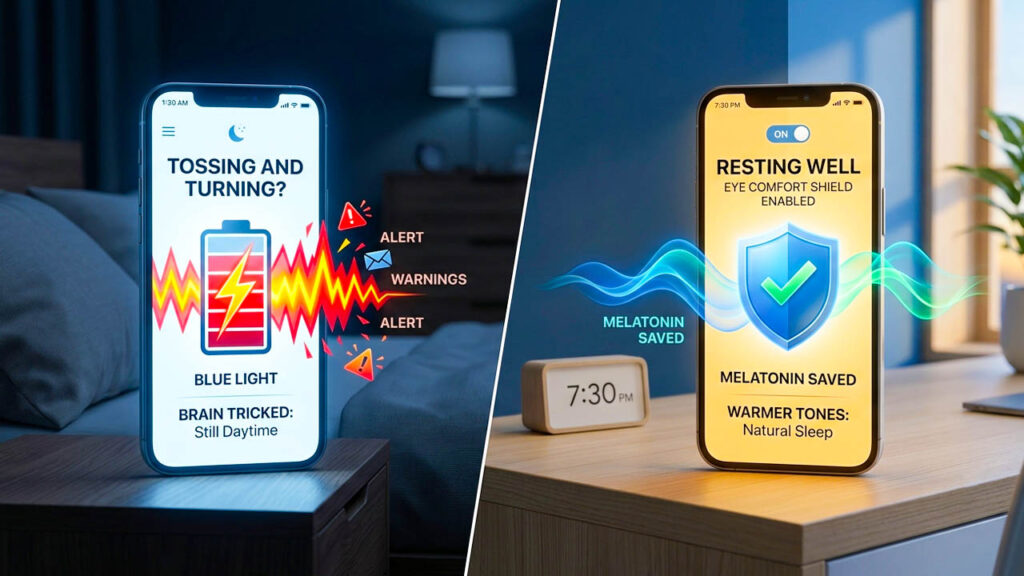
The primary culprit behind this modern sleeping dilemma is the intense blue light emitted by high-resolution smartphone screens. This specific wavelength of light tricks your brain’s internal evolutionary programming into believing that it is still high noon, completely derailing your body’s natural chemical readiness for rest.
Fortunately, you don’t have to banish technology from your bedroom entirely to reclaim your sleep health. By understanding the biological mechanics of how blue light alters your brain chemistry and configuring built-in automated software tools like Samsung’s “Eye Comfort Shield” or Apple’s “Night Shift” to launch at 7:00 PM, you can shield your eyes, restore your circadian rhythm, and fall asleep effortlessly.
The Evolutionary Design: How Your Brain Uses Light
To understand why a smartphone screen is so disruptive to your sleep architecture, we have to look back thousands of years at human evolution. Before the invention of electricity, lightbulbs, and digital displays, the human body relied entirely on one primary environmental cue to regulate daily behavior: the sun.
Our bodies operate on a built-in 24-hour biological biological clock known as the circadian rhythm. This internal clock coordinates everything from internal body temperature and metabolic rate to hormone production and cell repair cycles. The main conductor controlling this clock is a tiny cluster of cells in the brain called the suprachiasmatic nucleus (SCN).
The SCN relies heavily on the eyes to gather data about the time of day. Inside our retinas, there are specialized light-sensitive cells called intrinsically photosensitive retinal ganglion cells (ipRGCs). These cells do not help us see shapes or colors; instead, they are purely designed to detect the presence of short-wavelength blue light, which is incredibly abundant in natural morning sunlight.
The Melatonin Shutdown
When morning sunlight enters your eyes, the blue light stimulates these retinal cells, sending a direct signal to the SCN. The brain interprets this message clearly: It is daytime. Wake up, be alert, and focus. In response, the brain halts the production of melatonin, the hormone directly responsible for making you feel drowsy and transitioning your body into deep sleep.
As evening approaches and the sun goes down, the absence of blue light signals the brain to start pouring melatonin into your bloodstream. This chemical shift lowers your blood pressure, slows your heart rate, and creates that heavy-lidded, deeply relaxed sensation that lets you drift off to sleep.
When you look directly at a smartphone screen in a dark bedroom, you shatter this natural process. The display’s high-intensity light acts like a miniature pocket sun blasting blue light wavelengths directly into your retinas. Your brain registers this artificial light, instantly halts melatonin production, and tricks itself into thinking it is still daytime—shaking you back into an alert state exactly when you need to be winding down.
The Dark Side of Sleep Deprivation: What Happens to Your Body
When blue light disrupts your melatonin cycle, it doesn’t just delay the moment your eyes close; it compromises the overall quality of your rest. Sleep is not a passive state of unconsciousness; it is a highly active, crucial biological process divided into complex cycles of light sleep, Deep Sleep, and REM (Rapid Eye Movement) sleep.
By suppressing melatonin, late-night scrolling causes significant, long-term physical and mental consequences:
- Loss of Deep Sleep: Melatonin helps stabilize your deeper sleep stages. When its production is suppressed, you spend less time in restorative slow-wave sleep, which is the exact phase your body uses to rebuild muscle tissue, boost immune function, and balance hormones.
- Impaired Memory Consolidation: REM sleep is when your brain processes information, archives memories, and cleanses itself of metabolic waste. Shortchanging this cycle leaves you feeling mentally sluggish, forgetful, and easily distracted the next morning.
- Digital Eye Strain: Staring at a bright screen in a pitch-black room forces your pupils to constrict while trying to process high-contrast light. This causes eye fatigue, physical dryness, blurred vision, and tension headaches.
The 7:00 PM Solution: Automating Eye Comfort Shield and Night Shift
You might think the obvious solution is to lock your phone away in another room at sunset. While a complete digital detox is ideal, it isn’t always practical. Many of us use our phones in the evening to coordinate family schedules, read digital books, or decompress after work.
Thankfully, major smartphone manufacturers recognized this biological dilemma and engineered an elegant, software-based solution. Samsung devices feature “Eye Comfort Shield,” while Apple products utilize “Night Shift.”
When enabled, these utilities alter the color profile of your display. Instead of emitting harsh, crisp blue wavelengths, the software recalculates the pixels to display warmer, amber, and yellow tones. This subtle shifting mimics the warm color spectrum of a sunset or a cozy candlelit room, removing the aggressive blue wavelengths and allowing your brain’s natural melatonin production to proceed uninterrupted.
How to Automate It on iPhone (Night Shift)
To prevent yourself from having to remember to turn this feature on manually every evening, you should set a strict, automated daily schedule. Setting it to start at 7:00 PM gives your eyes and brain an optimal two-to-three-hour window to adjust before a typical 10:00 PM or 11:00 PM bedtime.
- Open the Settings app on your iOS device.
- Scroll down and tap on Display & Brightness.
- Select Night Shift.
- Toggle the Scheduled option to ON.
- Set the time frame from 7:00 PM to 7:00 AM (or your preferred wake-up time).
- Use the Color Temperature slider to adjust the warmth. Moving it closer to “More Warm” provides the ultimate protection against blue light.
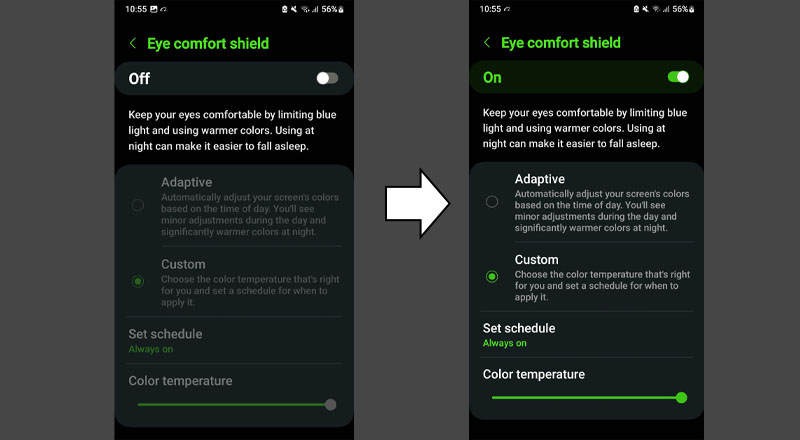
How to Automate It on Samsung (Eye Comfort Shield)
- Open the Settings app and tap on Display.
- Select Eye Comfort Shield.
- Toggle the feature to ON.
- Tap on Set schedule and choose Custom.
- Set your start time to 7:00 PM and end time to your normal morning alarm time.
- Adjust the Color temperature slider to a comfortable, warm amber hue.
Pro-Tips for the Ultimate Sleeping Routine
Automating your display settings is the single most effective baseline step you can take, but you can maximize your sleep hygiene by combining it with these simple electronic habits:
- Lower the Overall Brightness: Even warm, amber light can prevent deep relaxation if it is blaring at 100% capacity. When the evening arrives, turn your screen’s overall brightness level down as low as comfortably possible.
- Enable Dark Mode: Switching your system appearance from a bright white theme to an inverted dark layout drastically reduces the total volume of raw light output reaching your eyes.
- Establish a 15-Minute Buffer: Try to put the phone down completely at least 15 minutes before you want your eyes closed. Spend those final minutes letting your thoughts settle without incoming digital notifications.
Conclusion: Reclaim Your Nights
Your smartphone is a miracle of modern engineering, designed to keep you informed, connected, and entertained. However, its brilliant display was built for daytime visibility, not midnight relaxation.
You don’t need to choose between modern tech and a good night’s rest. By setting a recurring 7:00 PM automation for Eye Comfort Shield or Night Shift, you seamlessly bridge the gap between technology and human biology. You remove the invisible chemical barrier keeping you awake, giving your eyes a rest, protecting your brain chemistry, and finally unlocking the deep, restorative sleep your body truly deserves.